
XPolicyLab
To submit a policy for official evaluation, follow the official RoboDojo submission guide.
XPolicyLab
English | 简体中文
A Unified Standard and Open Ecosystem for Robot Policy Evaluation and Deployment
Website | arXiv | GitHub | RoboDojo Leaderboard | RoboTwin Leaderboard
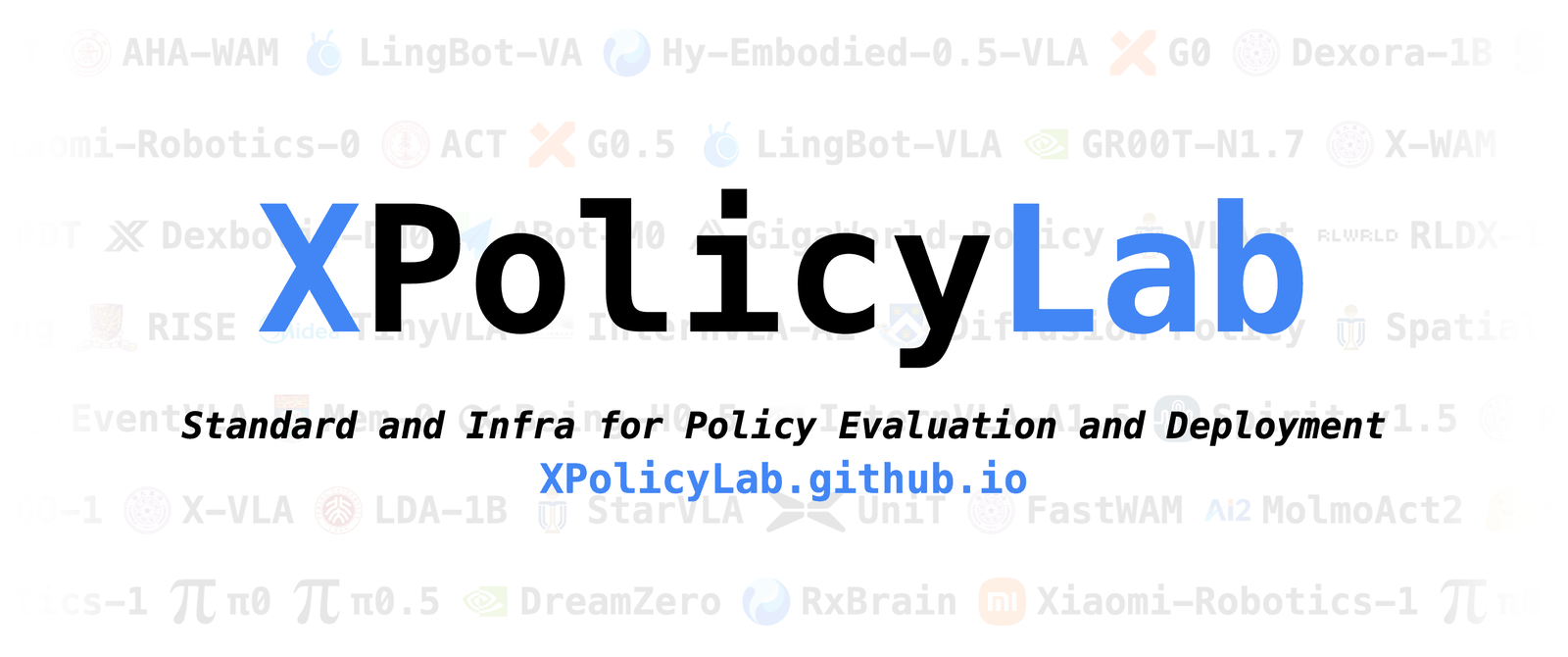
Connecting N policies to M evaluation environments — from O(N×M) down to O(N+M).
XPolicyLab is the shared layer between policy code and evaluation environments. Keep each model’s dependencies, checkpoints, and training recipes under policy/<POLICY>/; XPolicyLab handles the parts that are boring but easy to get wrong — serving, observation/action contracts, and eval wiring. As of September 2026, the ecosystem integrates 46 robot policies spanning VLA, world-action, imitation-learning, and memory-augmented families, and the same adapters serve RoboTwin, RoboDojo simulation, and standardized real-robot evaluation.
Start here for repo-level concepts and integration steps. For install commands, checkpoint layout, and training details, jump to that policy’s README — it is the source of truth for its model.
📚 Contents
Section titled “📚 Contents”- What XPolicyLab Enables
- Supported Benchmarks And Infrastructure
- Integrated Policies
- Framework Overview
- Quick Start
- Common Workflow
- Deployment Flow
- Standard Data Formats
- Data And Checkpoints
- Add Your Own Policy
- Coding Agents
- Citation
- Contact
🚀 What XPolicyLab Enables
Section titled “🚀 What XPolicyLab Enables”- Environment isolation: run the policy model in its own conda/uv environment while the simulator, benchmark, or robot client runs separately.
- Remote deployment: connect the policy server and environment client through websocket, either on one machine or across machines.
- A common adapter contract: use the same high-level lifecycle for installation, data conversion, training, serving, and evaluation.
- A large policy zoo: reuse adapters for VLA/WAM policies, imitation-learning baselines, and reference templates.
- Benchmark and infra integration: mount XPolicyLab into benchmark or simulator workspaces without coupling policy code to one environment.
🌐 Supported Benchmarks And Infrastructure
Section titled “🌐 Supported Benchmarks And Infrastructure”XPolicyLab is benchmark-agnostic: any benchmark, simulator, or real-robot setup can plug in as an environment client against the same policy-side interface — one adapter per policy, one client per environment. The benchmarks below are already integrated; the RoboDojo and RoboTwin official leaderboards are powered by XPolicyLab submissions.
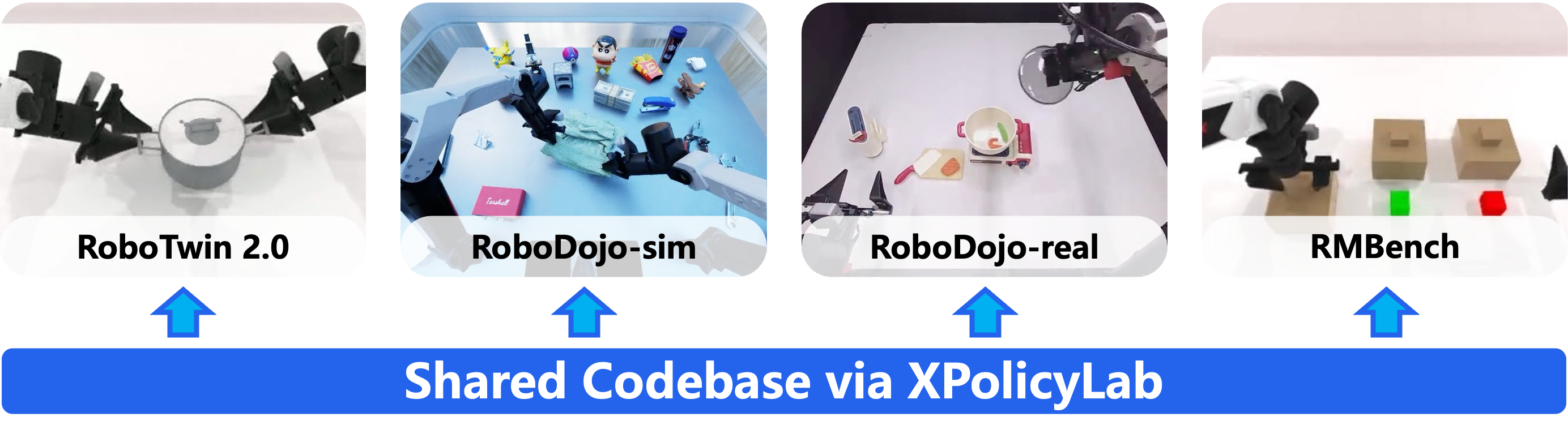
Cross-platform evaluation through a shared codebase and standardized serving interface.
Benchmarks
- RoboDojo: simulator-backed evaluation and RoboDojo-format data exports. The RoboDojo Leaderboard covers 42 simulation tasks across five capability dimensions (Generalization, Precision, Long-Horizon, Memory, Open) plus 18 real-robot tasks on three bimanual embodiments.
- RoboTwin: benchmark and data source through policy-specific adapters and conversion scripts. The RoboTwin 2.0 Leaderboard covers bimanual manipulation across 50 tasks under clean and randomized settings.
- RMBench: memory-dependent manipulation benchmark built on RoboTwin 2.0, with nine dual-arm tasks spanning levels of task memory complexity (paper, website). Its reference policy is integrated as Mem-0.
Infrastructure
- RLinf (coming soon): infrastructure target for policy development and deployment workflows.
- StarVLA: infrastructure and policy stack; see policy/starVLA.
🧭 Integrated Policies
Section titled “🧭 Integrated Policies”46 policies are currently integrated, spanning VLA, world-action, imitation-learning, and memory-augmented families, plus demo_policy as the minimal reference adapter. Top-level adapters live in policy/; each policy README documents that model’s paper/repo link, environment, data format, training entrypoint, and checkpoint layout.
Adding a policy of your own, or entering a leaderboard, both go through a PR — see Add Your Own Policy.
🧩 Framework Overview
Section titled “🧩 Framework Overview”XPolicyLab separates model-side dependencies from environment-side dependencies, so each side retains its native stack and may run locally or remotely. One adapter serves benchmarks, simulators, and physical robots.
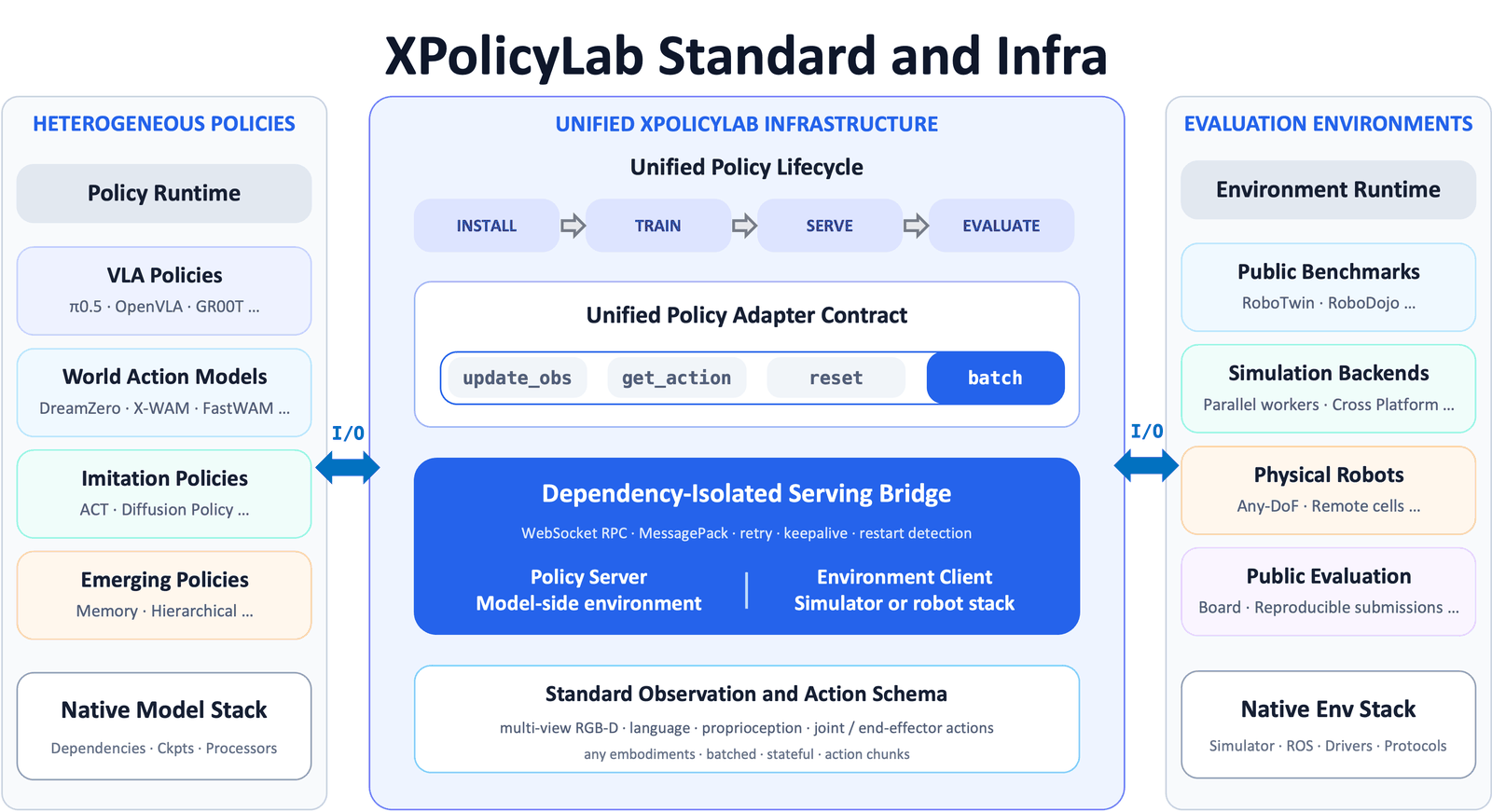
Infrastructure of XPolicyLab. One adapter serves benchmarks, simulators, and physical robots.
A typical adapter contains:
model.py implements the model-facing API. deploy.py bridges environment observations to model-server calls. Use policy/demo_policy as the minimal adapter reference.
model.py should define a Model class with this shape:
| Method | Contract |
|---|---|
init(model_cfg) | Load model config, checkpoints, processors, and per-run overrides from deploy.yml. |
update_obs(obs) | Update model state from one observation dictionary. |
update_obs_batch(obs_list) | Update model state from a list of observation dictionaries. |
get_action() | Return one action chunk as a list of action dictionaries. |
get_action_batch(env_idx_list=None) | Return batched action chunks aligned with active environment indices. |
reset() | Clear model-side state between evaluation episodes. It takes no arguments — a policy that needs a first observation should reset() and then take a normal update_obs. |
The policy server decodes camera colors before update_obs / update_obs_batch, so obs["vision"][<camera>]["color"] always arrives as an image array — model.py never decodes.
The default policy-server protocol is websocket (protocol: ws in deploy.yml); legacy_tcp exists only for adapters that have not migrated yet. The transport handles reconnects, retries, keepalive, and long model-loading cold starts for you — a normal adapter never touches it.
Transport details and timeout tuning (only if evaluation hangs or drops)
- Retries are safe: each request carries a
request_idthat the client reuses across reconnects, and the server answers duplicates from a cache instead of running a non-idempotent call twice. Atimeouterror is the exception — the server may still be running the call, so treat it as fatal for that trial rather than retrying. - Server restarts abort the run: if a reconnect lands on a different server process, the client raises
ServerRestartedError, because the fresh server lost the model state. - Cold start: the server loads the model before opening its port, so an early client just retries (default budget 15 min).
eval.shalso gates the client behindwait_for_policy_server.sh. - Errors: the client only sees
str(exc); the full traceback of a model failure is logged on the policy server side, so look there first. - Serialization is msgpack with numpy support (
torch.Tensorauto-converts). Three quirks:tuplearrives aslist, decoded numpy arrays are read-only views (copy before in-place edits), and int dict keys arrive as strings.
Optional deploy.yml keys — omit them to keep the defaults:
| Key | Default | Purpose |
|---|---|---|
request_timeout_s | 120.0 | Timeout for one update_obs / get_action call — raise it for slow inference. |
max_connect_attempts | 180 | Cold-start retries while the server is still loading. |
connect_retry_delay_s | 5.0 | Delay between those retries. |
max_connect_seconds | 900.0 | Wall-clock cap on the whole retry loop; 0 disables it. |
connect_timeout_s | 30.0 | Timeout for one connect attempt. |
handshake_timeout_s | 60.0 | Timeout for the HELLO round-trip. |
ws_ping_interval_s / ws_ping_timeout_s | 20.0 | Keepalive ping/pong; null disables. |
close_timeout_s | 10.0 | Cap on the closing handshake. |
⚡ Quick Start
Section titled “⚡ Quick Start”Clone XPolicyLab as a normal Python project for adapter development, offline checks, training from prepared data, or your own environment client:
You do not need a simulator to start model-side development: the bundled downloader fetches prepared RoboDojo data — several simulator export versions plus HDF5 RoboDojo_real real-world data — for training and offline debugging. If you use XPolicyLab/ as a subpackage inside the RoboDojo repository, follow RoboDojo’s own data download scripts instead.
Download a small Hugging Face demo bundle and keep the data next to XPolicyLab/:
This creates:
The same script pulls the full exports — hdf5, lerobot_v3.0, lerobot_v2.1, and real (real-world HDF5) — each into its own ../data/ folder. The two LeRobot exports come from the official converters, so you can regenerate them for your own task subset or resolution.
With this setup, you can test data conversion, model loading, training scripts, and debug-mode evaluation before connecting to a simulator-backed benchmark.
The template for any adapter is the same — swap demo_policy and the argument values:
For RoboDojo simulation, mount XPolicyLab/ beside the simulator-side env_cfg/, scripts/, src/eval_client/, and task/ directories.
🔄 Common Workflow
Section titled “🔄 Common Workflow”Most adapters expose the same top-level shape. Some policies add extra arguments, consume upstream-native datasets, or skip training support. Follow the policy README when it differs from this template.
What the arguments mean
Section titled “What the arguments mean”When you run eval.sh, you are mostly answering: which benchmark family, which task to run now, which checkpoint to load, which robot setup, joint or end-effector actions, and which seed. The same names travel through process_data.sh, train.sh, and eval.sh, so you do not have to rename things at every step.
| Argument | In plain English | Examples |
|---|---|---|
bench_name | Which benchmark or dataset family this run belongs to | RoboDojo, RoboTwin |
task_name | The task the environment client should run right now | stack_bowls, push_T — can differ from the tasks seen during training |
ckpt_name | Which weights to load: a short run nickname, the full run folder name, or a path | cotrain, RoboDojo-cotrain-arx_x5-joint-0, checkpoints/my_run/ |
env_cfg_type | Robot / camera / scene configuration key | arx_x5 |
action_type | Action space the policy outputs | usually joint or ee |
seed | Training or evaluation seed / layout id | 0, 1, 2 |
policy_gpu_id / env_gpu_id | Which GPU runs the model vs. the simulator/client | 0, 1 |
policy_env_or_uv_path | Conda env name or uv env path for the policy server | your policy-side env |
eval_env_conda_env | Conda env for the simulator / robot client | your eval-side env |
How ckpt_name resolves. Usually you pass the short nickname used during training, such as cotrain, and XPolicyLab combines it with the other args into checkpoints/RoboDojo-cotrain-arx_x5-joint-0/. You can also pass the full folder name, or a path — relative paths resolve from the policy directory, absolute paths work too. Some adapters honor explicit keys in deploy.yml (checkpoint_path, model_path, …). When in doubt, check the policy README.
A concrete eval example:
🔌 Deployment Flow
Section titled “🔌 Deployment Flow”During evaluation, the policy server and the environment client talk over websocket. That split is what lets you keep Isaac Sim / robot drivers on one machine and a heavy VLA on another.
For same-machine evaluation, eval.sh is enough — it starts the server, runs the client, and cleans up when you are done.
For split-machine deployment, start the policy server on the GPU machine and bind to 0.0.0.0 so other machines can reach it. The client connects to the policy machine’s real IP, not 0.0.0.0.
Then start the environment client on the simulator or robot machine:
<additional_info> is a comma-separated key=value string forwarded to the environment client. eval.sh builds it automatically as ckpt_name=<ckpt_name>,action_type=<action_type>, which is the right default for most adapters.
EVAL_ENV_TYPE selects the environment-side backend:
- unset or
sim: real simulator-backed evaluation, when the integration is installed. debug: offline wiring check — no Isaac, no robot, just shapes and IO.real: real-robot client path, where the hardware integration exists.
📐 Standard Data Formats
Section titled “📐 Standard Data Formats”XPolicyLab standardizes the observation and trajectory dictionaries passed between adapters, converters, and environment clients. Individual policies may convert this standard format into their upstream-native format.
Decode only through decode_image_bit
Section titled “Decode only through decode_image_bit”Always decode through
decode_image_bit, and always encode throughencode_image_bit. Both live inXPolicyLab.utils.process_data. Decoding image bits yourself is unsupported, because they come in two byte formats and a hand-rolled decoder is right on one and reverses the channels on the other.decode_image_bittells them apart and returns RGB for every version of the data, so its output never needs a channel swap. Offline conversion and training must go through it. Runtime observations arrive already decoded, somodel.pymust not decode at all.
Stored image bits come in two formats, and both decode to RGB:
| Format | How it was written | What a standard decoder sees |
|---|---|---|
| legacy | an RGB array handed straight to cv2.imencode, which reads its input as BGR | red and blue swapped — the bytes are channel-reversed against the JPEG standard, and cv2.imdecode reverses them back |
| standard | encode_image_bit, which converts to BGR first and stamps a JPEG COM segment with the payload XPL-RGB1 | correct colors |
Legacy data is never migrated — JPEG cannot swap channels losslessly — so the two formats coexist indefinitely and may appear in the same training run. The marker sits inside the buffer rather than in a file attribute so that a single buffer is self-describing, and COM is a standard segment that every decoder skips, so it costs 12 bytes and breaks nothing. If you must read these buffers without OpenCV, you can do it correctly: PIL surfaces the marker as Image.open(...).info["comment"], so check for b"XPL-RGB1" and reverse the channels yourself when it is absent. What you cannot do is skip the check — a PIL-based loader tested against fresh data looks perfect and then quietly corrupts older episodes.
All pose values use [x, y, z, qw, qx, qy, qz]. Images are RGB end to end — decode_image_bit hands back RGB and no channel conversion happens anywhere else in the pipeline. Note one naming quirk: runtime observations carry camera extrinsics as extrinsics_matrix, while trajectory files store extrinsic_matrix.
Observation Data Format
Trajectory Data Format
Useful converter helpers:
decode_image_bit and encode_image_bit are the only supported codec for trajectory image bits (see above). They mirror each other’s input handling — one frame or a sequence, in any of the containers the trajectory files use — and already-converted values pass through untouched. get_robot_action_dim_info(env_cfg_type) returns robot-specific arm_dim and ee_dim lists, so adapters do not need to hard-code action dimensions.
CONTRIBUTING.md states the RGB exceptions and how a new robot gets registered in both _robot_info.json files.
Official LeRobot conversion
Section titled “Official LeRobot conversion”Many policies train on LeRobot datasets instead of the trajectory format above. scripts/transform_lerobot_v21_format.py and scripts/transform_lerobot_v30_format.py are the official converters — one per LeRobot dataset version, both emitting the same keys.
LeRobot format
| Key | Shape | Content |
|---|---|---|
observation.state | (D,) float32 | left_arm_joint_states + left_ee_joint_states + right_arm_joint_states + right_ee_joint_states, concatenated in that order |
action | (D,) float32 | same layout, from the trajectory’s action/ group |
observation.images.cam_high | (3, H, W) video | vision/cam_head/colors |
observation.images.cam_left_wrist | (3, H, W) video | vision/cam_left_wrist/colors |
observation.images.cam_right_wrist | (3, H, W) video | vision/cam_right_wrist/colors |
Prepared LeRobot exports published for a benchmark — such as the lerobot_v2.1 / lerobot_v3.0 sets in Quick Start — are produced this way, so a policy that consumes one needs no conversion step of its own.
A policy that trains on LeRobot data must say so in its own README, under
Data Processing: the dataset version, and whether the keys are the ones above. If they are, name the converter and say whetherprocess_data.shis absent or only links and normalizes the dataset. If they are not — an upstream-native layout, extra keys, a latent tree, different camera names — state the differences and how to produce that layout. policy/RISE and policy/AHA_WAM are worked examples of the first case, policy/LingBot_VA of the second.
Running a conversion
Both scripts take <bench_name>.<task_name>.<env_cfg_type> glob patterns, read trajectories from ../data/ and robot dimensions from ../env_cfg/, and merge every matched target into one dataset under HF_LEROBOT_HOME/<repo_id>. Run them from the repo root of a checkout that sits beside those two directories (Quick Start).
Dis padded, not per-robot. Each arm is zero-padded to the widest dimensions among the matched targets, so one dataset can mix robots;robot_typeisunified_robotand motors are namedleft_joint_<i>/right_joint_<i>.- All three camera keys always exist. A camera missing from the source is filled with black frames, so features stay stable across robots.
- Images are RGB, decoded through
decode_image_bitand never swapped afterwards (above). - Joint-space bimanual only. Both read the
*_arm_joint_states/*_ee_joint_stateskeys and fail on a trajectory that carries only pose or single-arm keys. - The two differ beyond dataset version only in encoding throughput: v3.0 writes images from 8 worker processes and streams video at CRF 18.
💾 Data And Checkpoints
Section titled “💾 Data And Checkpoints”Training and data prep usually name things predictably so eval can find them without guesswork:
So if you trained with bench_name=RoboDojo, ckpt_name=cotrain, env_cfg_type=arx_x5, action_type=joint, seed=0, the run lands in checkpoints/RoboDojo-cotrain-arx_x5-joint-0/. How ckpt_name maps back to these folders at eval time is covered in Common Workflow.
Policies may also use upstream-native layouts or explicit paths in deploy.yml. Check the policy README before assuming a naming convention. For a small local dataset to play with, see Quick Start.
🤝 Add Your Own Policy
Section titled “🤝 Add Your Own Policy”Community policies are welcome — open a PR that adds policy/<POLICY>/. A PR is also required to enter the official RoboDojo and RoboTwin leaderboards, together with the checkpoint that reproduces your results.
How to scaffold an adapter, what a submission must contain, the checks to run before a PR, and the PR template all live in CONTRIBUTING.md. Start from policy/demo_policy, or bash scripts/create_policy.sh <POLICY_NAME>.
🤖 Coding Agents
Section titled “🤖 Coding Agents”Two skills under .agents/skills are loaded by Cursor, Claude Code, and Codex (via .cursor/skills and .claude/skills symlinks). AGENTS.md is the always-on rule set.
xpolicylab-model-integration— build an adapter. A prompt likeIntegrate <POLICY_NAME> into XPolicyLabis enough.xpolicylab-adapter-check— audit one before a PR (Check https://github.com/XPolicyLab/XPolicyLab/tree/main/policy/<POLICY_NAME>).
The paste-in checklist for agents that load none of these is in CONTRIBUTING.md.
📝 Citation
Section titled “📝 Citation”If XPolicyLab helps your research, please cite:
📬 Contact
Section titled “📬 Contact”Tianxing Chen (project lead): chentianxing2002@gmail.com
A collaborative open-source project led by MMLab@HKU and THU.
Core Lead Authors: Tianxing Chen, Yue Chen, Tian Nian, Zijian Cai, Guangyu Chen, Wenwei Lin, Qiwei Liang.
The full contributor list — spanning every integrated policy — lives on the project website.